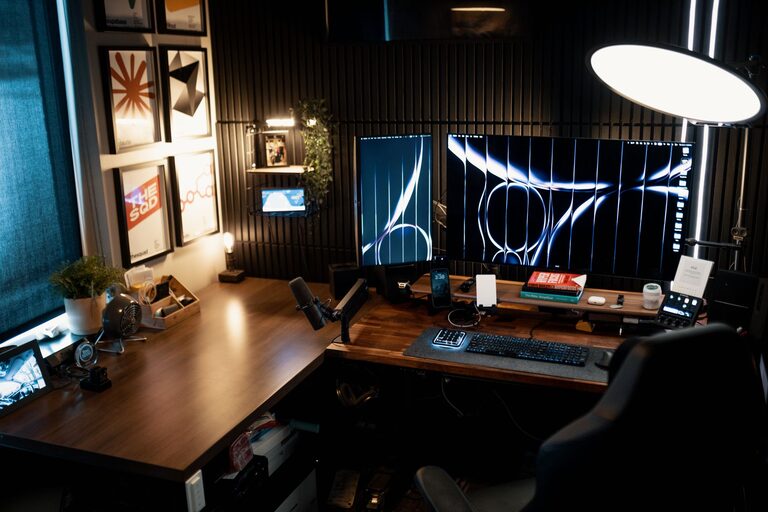
Creating a home workspace that is both cozy and functional can greatly enhance your productivity and overall work experience. Whether you’re working from home full-time or just need a dedicated spot for occasional tasks, a well-designed workspace can help you stay focused and comfortable throughout the day. In this post, we’ll explore practical tips and ideas to set up a home office that suits your style and work needs.
1. Choose the Right Location
Start by selecting a space in your home that minimizes distractions and promotes concentration. Look for a quiet corner, spare room, or even a nook with natural light. Having a dedicated area for work helps separate your professional tasks from the rest of your home life.
Consider natural lighting
Natural light not only brightens up your workspace but also boosts mood and energy. Position your desk near a window if possible. If natural light is limited, invest in good quality task lighting like adjustable desk lamps.
2. Invest in Ergonomic Furniture
Comfort is key when it comes to setting up a functional workspace.
– Chair: Choose an ergonomic office chair that supports your back and encourages good posture. Adjustable height and lumbar support make a big difference.
– Desk: Select a desk with enough surface area to accommodate your computer, paperwork, and other essentials. Standing desks or adjustable desks offer flexibility for alternating between sitting and standing.
3. Declutter and Organize
A clutter-free environment promotes focus and reduces stress.
– Use drawer organizers, shelves, or storage boxes to keep supplies tidy.
– Keep only items you regularly use on your desktop.
– Cable management tools such as clips and sleeves can prevent unsightly cords from tangling.
4. Personalize Without Overcrowding
Adding personal touches to your workspace can make it feel inviting, but avoid clutter.
– Hang a few favorite art pieces or photos.
– Add plants for a touch of nature and improved air quality.
– Choose accessories and decor that reflect your style but keep them minimal to maintain a clean workspace.
5. Optimize Technology Setup
A smooth tech setup supports productivity.
– Ensure your internet connection is strong in the workspace.
– Use a wireless keyboard, mouse, or headphones to reduce cable mess.
– Position your monitor at eye level to avoid neck strain.
6. Create Zones for Different Tasks
If space allows, designate areas for different activities, such as:
– A primary workstation for computer work.
– A reading or brainstorming corner with a comfortable chair and good lighting.
– A storage zone for files and office supplies.
7. Consider Acoustics and Privacy
To maintain focus, reduce noise distractions.
– Use rugs, curtains, or acoustic panels to absorb sound.
– Consider noise-cancelling headphones if your environment is loud.
– If possible, use room dividers or doors to separate your workspace from household activity.
8. Incorporate Adequate Storage Solutions
Efficient storage keeps your workspace organized and functional.
– Use vertical storage like wall-mounted shelves to save space.
– Label boxes and files for easy access.
– Rotate supplies seasonally to keep only what you need close by.
9. Set Boundaries and Maintain Routine
A cozy and functional workspace also depends on how you use it.
– Define your work hours and stick to a routine.
– Communicate boundaries with household members to minimize interruptions.
– Take breaks and step away to refresh your mind.
10. Refresh Your Workspace Periodically
Over time, your needs or preferences may change.
– Reassess your setup periodically to improve comfort or efficiency.
– Add new organizational tools or update decor to keep the space inspiring.
—
Creating a cozy, functional workspace at home is an investment in your comfort and productivity. By thoughtfully selecting your space, furnishing it ergonomically, staying organized, and personalizing it tastefully, you can build an environment that supports your best work. Start with these tips and tailor your workspace to what feels right for you.

Related Posts